Vulnerabilities Table
The Vulnerabilities table shows a list of vulnerabilities detected by the VTM service for a particular client depending on the selected scan group and patch publication date.
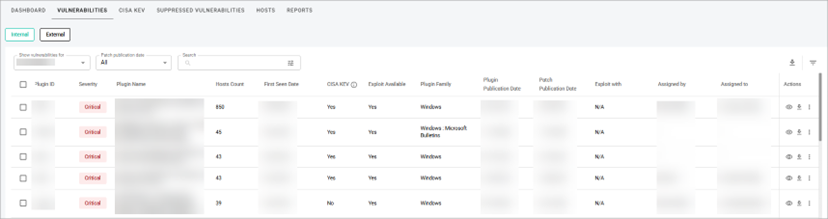 In the Vulnerabilities table, the information is grouped into the following columns:
- Plugin ID—a unique identification number of a plugin.
- Severity—a categorization of the risk and urgency of a vulnerability (Critical, High, Medium, Low).
- Plugin Name—a title of a plugin.
- Hosts Count—the number of hosts affected by a vulnerability.
- First Seen Date—the date when the vulnerability was first detected.
- CISA KEV—shows whether a vulnerability is related to the CISA KEV list.
- Note: CISA’s Known Exploited Vulnerabilities (KEV) catalog is an authoritative list of vulnerabilities confirmed to be actively exploited in the wild. Maintained by CISA, the KEV catalog is a key resource for prioritizing remediation based on real-world threat activity.
- Exploit Available— shows if the supported software packages (exploitation frameworks) that contain reliable exploit modules and other useful features, such as agents used for successful repositioning, are available or not.
- Plugin Family—shows the Family to which a plugin belongs.
- Plugin Publication Date—a date when a plugin that identifies a vulnerability is published.
- Patch Publication Date—a date when a vendor published a patch for a vulnerability.
- Exploit with—shows supported software packages (exploitation frameworks) that contain reliable exploit modules and other useful features, such as agents used for successful repositioning.
- Assigned by—shows a user who assigned a vulnerability to a user.
- Assigned to—shows a user who was assigned to work on the vulnerability.
- Actions—shows the following actions:
- View details—you can view the detailed information about a vulnerability from the list (see View Vulnerability Details).
- Download vulnerability—you can download information about a vulnerability from the list (see Download Vulnerabilities Information).
- Other—you can view the hidden actions:
- The Assign icon with which you can assign a vulnerability to a user who will work on it (see Assign Vulnerability).
- Ask question icon with which you can ask a question about the vulnerability (see Ask Question about Vulnerability).
- The Suppress icon with which you can accept the vulnerability.
- Create Task—lets you create a new task and add task details.
- Note: You can also create tasks for multiple vulnerabilities by selecting the vulnerabilities, opening the Actions menu in the upper-right corner of the table, and choosing Create Task.
The information in the Plugin ID, Severity, Plugin Name, Hosts Count, Patch Publication Date, Plugin Family, and Plugin Publication Date columns can be sorted by selecting the Arrow icon near a column name. To see the icon, hover over a column name
Related Topics